Looking for Help with Assignments?
-RUCats has 80 hours of tutoring available online and in-person. Check the tutoring tab in Canvas!
-Instructors and Lead TAs have a combined 10 hours of Office Hours, open to all sections. See times/locations here.
-Piazza (found in the Canvas sidebar) provides fast support from Course Staff and other Students. Be sure to search to see if someone has asked a similar question!
-If you need a computer to complete work on, iLab machines can be found in the CSL (Hill 252) and surrounding rooms.
Cyber Crime Database – 110 course points
This assignment will take MORE time to complete than the previous assignment.
Start your assignment early! You will need time to understand this assignment and any questions it may present.
Refer to our Programming Assignments FAQ for instructions on how to install VSCode, how to use the command line and how to submit your assignments.
The assignment has two components:
-
Coding (107 points) submitted through Autolab.
-
Reflection (3 points) submitted through a form.
-
Submit the reflection AFTER you have completed the coding component.
-
Be sure to sign in with your RU credentials! (netid@scarletmail.rutgers.edu)
-
You cannot resubmit reflections, but you can edit your responses before the deadline by clicking the Google Form link, signing in with your NetID, and selecting “Edit your response.”
-
Overview
Cyber Security is a vital branch of computer science which handles our systems, applications, and information. From the FBI website:
As people around the world become more reliant on information and communication technologies (ICTs), criminals are increasingly shifting online. In 2020 alone, the FBI estimated more than $4 billion was lost to cybercrime in the United States.
Implementation
Overview of files provided
The Hacker class allows you to create instances of Hackers; it stores information like the main name of the Hacker, a list of known aliases, and a list of Incidents this Hacker was involved in. Do not edit or submit to Autolab.
The CyberCrimeDatabase class contains methods that manipulate a Hash table in order to create a Hacker Database and analyze its information. Edit the empty methods with your solution, but DO NOT edit the provided ones or the method signatures of any method. This is the file you submit.
The Driver class visualizes the Hacker Database, and provides options for reading from a file, viewing Hacker information, deleting Hackers, combining Hackers, and viewing Hackers by OS.
StdIn and StdOut are libraries that handle input and output. Do not edit these classes.
Multiple input files are included; they store different hacker information and their incidents. You are welcome to create your own input files, as they will not be submitted to Autolab
CyberCrimeDatabase.java
DO NOT add new import statements.
DO NOT change any of the method’s signatures.
Methods to be implemented by you:
initializeDatabase() [PROVIDED]
This method reads lines from an input file and calls the following two methods to create a Hacker object and insert it into the hackerDatabase Hash Table.
You are given input files containing different Hacker information as well as their incident information. Each hacker has 7 lines, formatted as follows.
For IPs and URLs, we used a one-way hash called MD5 in order to de-identify URLs and IPs that could be malicious. We aren’t working with real IPs and URLs to avoid links to malicious sites.
- Hacker Name
- IP Address Hash
- Location
- OS
- Web Server
- Date
- URL Hash
Do not update this method, it has been implemented for you. IMPLEMENT the first two methods (readSingleHacker and addHacker).
1. readSingleHacker()
This method reads the information for a single incident for a single hacker and creates the corresponding objects.
Remember that the order you will read items in is as follows, and each is contained on one line:
Hacker Name (string that may contain spaces, use StdIn.readLine() to read)
IP Address Hash (a string)
Location (a string that may contain spaces)
OS (a string that may contain spaces)
Web Server (a string that may contain spaces)
Date (a string YYYY-MM-DD)
URL Hash (a string)
You can assume StdIn.setFile() has already been called, and simply call StdIn.readLine() once for each above bullet.
Create an Incident object, using the OS, Web Server, Date, Location, IP Address Hash, and URL Hash (the constructor is not necessarily in the same order as the input file). Then, create a Hacker object using the name, and Incident. Remember that hackers have an ArrayList of incidents.
Return that Hacker object.
Test this using initializeDatabase AFTER you have implemented the addHacker method. Use the debugger in VS Code to verify that items are being read and created correctly on each iteration of this method.
EARLY SUBMISSION CONSISTS OF THIS METHOD AND addHacker. Make sure you submit BOTH methods for early submission; we will not make exceptions if you only implement this method.
2. addHacker(Hacker toAdd)
This method inserts a Hacker into the hash table stored at hackerDatabase.
You are given a Hacker object to insert, via the method parameters. This is the candidate that we will attempt to insert – no duplicates are allowed.
Calculate which Hash Table index this hacker belongs to with Math.abs(hacker.hashCode()) % tableLength (where tableLength is the length of the hackerDatabase array).
Then, check the Linked List found at that Hash Table index:
If the list is empty, add that Hacker to the list. YOU MUST increment numHackers by 1 when a unique hacker is added, even when the list is empty, and you MUST call resize if the load factor is met even when inserting into an empty list.
If the hacker’s name already exists in that list, then add all of the toAdd Hacker’s incidents to the existing Hacker object you found.
You can use hacker.getIncidents().addAll( toAdd.getIncidents() ) to add the new Hacker’s incidents to the existing Hacker (replace “hacker” with the existing Hacker object you found).
If the hacker’s name is not found in the list at that index, add the hacker to the END of the list and increment numHackers by 1.
AFTER YOU INSERT, check if the number of hackers in the table (numHackers) is >= the length of hackerDatabase divided by 2. If it is, then call the resize() method (seen below). DO NOT do this if you did not insert a new LLNode.
Early submission. Implement the first two methods for extra credit: readSingleHacker() and addHacker(). We will not make exceptions if you only implement one method. You do NOT need to implement resize() for early submission; we’ll only test early submission with tables that do not resize.
This is the expected output in the driver when attempting to run hackerTest.in (which does NOT rehash).

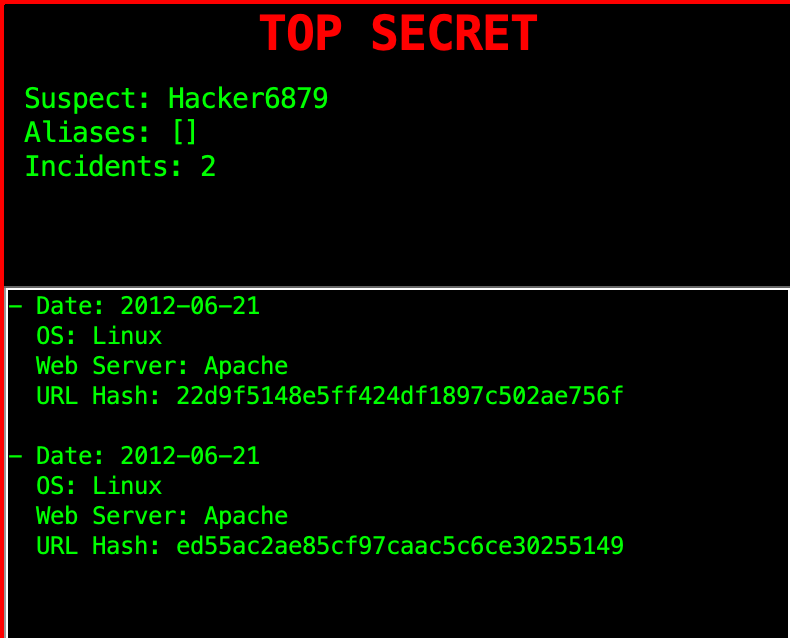
You can view incidents by clicking the “View Incidents” button.
Here’s a text based representation:
Index 0
{Suspect: Hacker7658, Num Incidents: 1}
{OS: Linux, Web Server: Apache, URL Hash: 1a320cc7e82d4e9dd0b251cda1e5149b, IP Hash: 8692d611f3c49198155ffaa6f2f4e8fe, Location: Indonesia}
Index 1
Index 2
Index 3
{Suspect: Hacker6313, Num Incidents: 2}
{OS: Linux, Web Server: Apache, URL Hash: a6e869c4ae9a48eb1bc2b54fa03db660, IP Hash: 126e7450a80a4689d5977980cce05883, Location: France}
{OS: Linux, Web Server: Apache, URL Hash: 775c0a468b31b4321922c66177f4f8b0, IP Hash: 126e7450a80a4689d5977980cce05883, Location: France}
Index 4
Index 5
{Suspect: Hacker8850, Num Incidents: 2}
{OS: Linux, Web Server: Apache, URL Hash: b2aec8b43de6bfb640e8bc361f02e926, IP Hash: 157ef7f43422d9fae16234410796f823, Location: United States}
{OS: Linux, Web Server: Apache, URL Hash: b61bd74247657f91c4540359d635f403, IP Hash: 157ef7f43422d9fae16234410796f823, Location: United States}
Index 6
{Suspect: Hacker6879, Num Incidents: 2}
{OS: Linux, Web Server: Apache, URL Hash: 22d9f5148e5ff424df1897c502ae756f, IP Hash: dea0daf8749639f8618c64c7b092325c, Location: European Uni}
{OS: Linux, Web Server: Apache, URL Hash: ed55ac2ae85cf97caac5c6ce30255149, IP Hash: ecc205bf2f3cc3b8ce8e48503bcf5c5d, Location: Italy}
Index 7
Index 8
Index 93. resize()
This method resizes the existing hackerDatabase Hash Table, to double the current length.
Create a temp LLNode<Hacker>[], and set it to the existing hackerDatabase array. This will be the old array that we will reference. Since each Hacker gets reinserted in addHacker(), numHackers will be reset to 0.
Then, set the hackerDatabase instance variable to a brand new LLNode[] object, with its size as double the old hackerDatabase length. Don’t use <> when initializing this, see how we did it in the CyberCrimesDatabase constructor. This is because Java blocks making arrays with generics types.
Finally, loop through your old hackerDatabase (stored in your temp variable), and call your addHacker() method on each hacker to reinsert them into your larger table.
RESTART the driver if you already read hackerTest.in or another file.
The input files that rehash are large, it’s best to use the debugger to verify that items are being inserted correctly across multiple rehashes. If nothing is listed under an index, it’s empty.
This is the first 20 indices for hacker2.in – since this is large, we’re providing a text representation. Use “View Incidents” to see incidents and number of incidents.
Index 0
Index 1
Index 2
Index 3
Index 4
Index 5
Index 6
Index 7
Index 8
Index 9
Index 10
{Suspect: Hacker2626, Num Incidents: 6}
{OS: Linux, Web Server: Apache, URL Hash: 172882f07ecdcd8d42de3a2f07fa9607, IP Hash: e817cc1d765b4920424d3a3b001452b5, Location: European Uni}
{OS: Linux, Web Server: Apache, URL Hash: 459eaf92f4f8536a685be1f3736a51f6, IP Hash: 38c69655d13e9a5c8912cf40951f2154, Location: United States}
{OS: Linux, Web Server: Apache, URL Hash: 617ab4c6bfb906fbacfbd7d40133a8e0, IP Hash: 72d70361f5c1fec38965d7931b4c3fd0, Location: United States}
{OS: Linux, Web Server: Apache, URL Hash: 3415706925c4137b1e57b3dd6cd81c48, IP Hash: 4e06aab35ba391ed833d3e103592357f, Location: United States}
{OS: Linux, Web Server: Apache, URL Hash: 1246b51b663cb1d86ebe39cb445fba9c, IP Hash: e7c4494a0b2ea0c8ce8148a297f6090a, Location: United States}
{OS: Linux, Web Server: Apache, URL Hash: 840c3b2f6d4d918ee61f5998fbec54e2, IP Hash: 4e321ab435dc09055fc55a77831e4f97, Location: United States}
Index 11
{Suspect: Hacker4308, Num Incidents: 1}
{OS: Linux, Web Server: Apache, URL Hash: 9d21a764728221f50ae565b452768934, IP Hash: f2d4ec8598283416a9b3b1249ad81999, Location: United States}
Index 12
Index 13
Index 14
Index 15
Index 16
{Suspect: Hacker6789, Num Incidents: 2}
{OS: Linux, Web Server: Apache, URL Hash: 22d9f5148e5ff424df1897c502ae756f, IP Hash: dea0daf8749639f8618c64c7b092325c, Location: European Uni}
{OS: Linux, Web Server: Apache, URL Hash: ed55ac2ae85cf97caac5c6ce30255149, IP Hash: ecc205bf2f3cc3b8ce8e48503bcf5c5d, Location: Italy}
Index 17
{Suspect: Hacker9758, Num Incidents: 1}
{OS: Linux, Web Server: Apache, URL Hash: 5cd45772fa424c4a634300336e165674, IP Hash: 4d3f24f4d89daa06ae478633d5dec18e, Location: Germany}
{Suspect: Hacker8812, Num Incidents: 1}
{OS: FreeB, Web Server: Apache, URL Hash: f4471bb06fbd315019b5e007625df615, IP Hash: 88f2b0fca35de2076db48efd29856d41, Location: Sweden}
{Suspect: Hacker6139, Num Incidents: 1}
{OS: Linux, Web Server: Apache, URL Hash: e129227e161872f12db500f89f7934f9, IP Hash: 96f5553c5e438a1978e3e761b54cbb9a, Location: United States}
Index 18
{Suspect: Hacker9658, Num Incidents: 1}
{OS: Linux, Web Server: Apache, URL Hash: c90fc10b2ec03b6c8eea44d380a20ba4, IP Hash: 0a0f4995422e59de2096fbff37327c5d, Location: United States}
Index 19
4. find(String toSearch)
This method searches for a given Hacker name in the hackerDatabase, and returns that Hacker object if it is found. We will test this method separately, but this is a helper for other methods.
If it is not found, return null.
You can determine which index the Hacker should be at with:
Math.abs(toSearch.hashCode()) % hackerDatabase.length
To test this method, you can:
– Use a JUnit test where you run initializeDatabase on a CyberCrimesDatabase object, call find afterward and then compare the result.
– OR use the debugger when you call find in other methods.
5. delete(String toDelete)
This method searches for a given Hacker name and removes that Hacker object (and corresponding LLNode) from the hackerDatabase if it is found.
You should attempt to locate the specified hacker the same as in find(). This time, if you find them perform Singly Linked-List deletion on that HNode.
If you find and successfully remove the Hacker, decrement numHackers by one. Return the Hacker object for the hacker removed, or if you don’t find the hacker to remove then return null.
To test this method, hit “Delete File” in the Driver to delete the record we have of a hacker.
You can check the output manually to see if your deletion succeeded – use your knowledge of singly linked list deletion to do so, and make sure you correctly handle cases of deleting the front, middle, and end.
Alternatively, you can use a JUnit test to check the list.
6. combineHackers(String hacker1, String hacker2)
This method takes two Hacker names as parameters, and attempts to combine them into one Hacker.
You can use your find() method to find both Hacker objects in hackerDatabase. If either is not found, return false.
If both hackers are found, attempt to combine the hacker with LESS incidents into the one with more. If they have the same amount of incidents, combine hacker2 into hacker1.
To combine two hackers, add all incidents from one hacker (Hacker A) into the hacker you wish to combine into (Hacker B). Then, add Hacker A’s name as an alias for Hacker B. Finally, delete Hacker A, using your delete method. Return true if successful.
When merging Hacker4308 -> Hacker2626 in hacker2.in, Hacker2626 stays, gains Hacker4308 as an alias and Hacker4308 is deleted. Here are the outputs and incidents.
RESTART the driver if you have combined or removed before.
- Date: 2012-06-25 Location: European Uni IP Hash: e817cc1d765b4920424d3a3b001452b5 OS: Linux Web Server: Apache URL Hash: 172882f07ecdcd8d42de3a2f07fa9607 - Date: 2012-06-26 Location: United States IP Hash: 38c69655d13e9a5c8912cf40951f2154 OS: Linux Web Server: Apache URL Hash: 459eaf92f4f8536a685be1f3736a51f6 - Date: 2012-06-26 Location: United States IP Hash: 72d70361f5c1fec38965d7931b4c3fd0 OS: Linux Web Server: Apache URL Hash: 617ab4c6bfb906fbacfbd7d40133a8e0 - Date: 2012-06-26 Location: United States IP Hash: 4e06aab35ba391ed833d3e103592357f OS: Linux Web Server: Apache URL Hash: 3415706925c4137b1e57b3dd6cd81c48 - Date: 2012-06-26 Location: United States IP Hash: e7c4494a0b2ea0c8ce8148a297f6090a OS: Linux Web Server: Apache URL Hash: 1246b51b663cb1d86ebe39cb445fba9c - Date: 2012-06-26 Location: United States IP Hash: 4e321ab435dc09055fc55a77831e4f97 OS: Linux Web Server: Apache URL Hash: 840c3b2f6d4d918ee61f5998fbec54e2 - Date: 2012-06-26 Location: United States IP Hash: f2d4ec8598283416a9b3b1249ad81999 OS: Linux Web Server: Apache URL Hash: 9d21a764728221f50ae565b452768934
7. getNMostWanted(int n)
In this method, you’ll find the most wanted hackers in the hackerDatabase, and return them in an ArrayList. The number of Hackers in your list is determined by the parameter “n”. (i.e. return the Top N hackers, such as Top 10, Top 50, Top 100, etc…). Hacker ranking is determined by number of incidents, and ties are broken by a Hacker’s name (this is done for you in the Hacker compareTo() method).
To do this, we can use a Priority Queue, specifically a Max Heap. We provide a MaxPQ.java class for this purpose, which you can use.
Create a new MaxPQ object, which holds Hacker objects (MaxPQ uses generics, so just like with ArrayLists you’ll need to specify a type). USE the MaxPQ class that’s provided to you, DO NOT use other implementations or implement a priority queue from scratch.
Insert every Hacker in the hackerDatabase HashTable into your MaxPQ object. The MaxPQ will reorder based on the Hacker compareTo() method.
Using the MaxPQ, add the top N most wanted Hackers to an ArrayList, and return this ArrayList.
Here are the top ten most wanted hackers for hacker2.in. RESTART the driver if you have combined or deleted any Hackers.

8. getHackersByOS(String location)
In this method, you’ll find all Hackers who have used a given OS (operating system), and return them in an ArrayList. Create an ArrayList of Hackers, to store any matching Hackers. Iterate through all incidents of each Hacker in the hackerDatabase, if their OS matches the given OS, then add the Hacker to your list. Finally, return your list of hackers for the given OS. Make sure there are no duplicates.
These are the hackers by OS for “Win 2” in hacker1.in. Use the “Win 2” option in the location dropdown in the driver to sort by location, it’ll open up a popup. RESTART the driver if you have combined or removed items.

Implementation Notes
YOU MAY only update the methods with the WRITE YOUR CODE HERE line.
COMMENT all print statements you have written from CyberCrimeDatabase.java
DO NOT add any instance variables to the CyberCrimeDatabase class.
DO NOT add any public methods to the CyberCrimeDatabase class.
DO NOT add/rename the project or package statements.
DO NOT change the class CyberCrimeDatabase name.
YOU MAY add private methods to the CyberCrimeDatabase class.
YOU MAY use any of the libraries provided in the zip file.
DO NOT use System.exit()
VSCode Extensions
You can install VSCode extension packs for Java. Take a look at this tutorial. We suggest:
Importing VSCode Project
Download CyberCrimeDatabase.zip from Autolab Attachments.
Unzip the file by double clicking.
Open VSCode
Import the folder to a workspace through File > Open
Executing and Debugging
You can run your program through VSCode or you can use the Terminal to compile and execute. We suggest running through VSCode because it will give you the option to debug.
If you choose the Terminal:
first navigate to CyberCrimeDatabase directory/folder
to compile: javac -d bin src/cyber/*.java
to execute: java -cp bin cyber.Driver
Before submission
COMMENT all printing statements you have written from CyberCrimeDatabase.java
Collaboration policy. Read our collaboration policy on the course syllabus.
Submitting the assignment. Submit CyberCrimeDatabase.java separately via the web submission system called Autolab. To do this, go to Autolab and find the correct assignment and submit your Java file.
Getting help
If anything is unclear, don’t hesitate to drop by office hours or post a question on Piazza.
By Colin Sullivan
Assignment Concept by Navya Sharma and Pooja Kedia