
Music Library – 110 course points
In this assignment, you will create an implementation of a music streaming application. You will practice circular linked list manipulation, referencing objects, reading from CSV files, and object-oriented programming (OOP).
This assignment will take LONGER to complete than any of the labs.
Start your assignment early! You will need time to understand this assignment and any questions it may present.
You can download and submit the project files via Autolab.
Refer to our Programming Assignments FAQ for instructions on how to install VSCode, how to use the command line and how to submit your assignments.
See this video on how to import the project into VSCode and how to submit into Autolab.
The assignment has two components:
Coding (107 points) submitted through Autolab.
Reflection (3 points) submitted through a form (found in the assignments section of this website, or the canvas announcement).
Submit the reflection AFTER you have completed the coding component.
Be sure to sign in with your RU credentials! (netid@scarletmail.rutgers.edu)
You cannot resubmit reflections, but you can edit your responses before the deadline by clicking the Google Form link, signing in with your NetID, and selecting “Edit your response.”
Overview
Apps such as Spotify, Apple Music, and Pandora are applications known as music streaming services. They allow users to stream digitally copyrighted music or on-demand music by joining a subscription. This is done by having songs that are being played point to a reference to a song on the streaming service’s database, which allows for better space efficiency than copying the song into the user’s device. Each song also holds metadata (or “data about data”) for each song, as having proper accreditation is necessary to ensure artists and songwriters receive proper compensation. if you wish to read more about what metadata is and why it matters, you can do so here.
For this assignment, you will assume that the database is centralized in the music folder and that each of the music objects holds a “link” to each song a user may add to their playlist. Therefore, playlists (which are implemented using circular linked lists) can be flexibly created by having a reference to the song object rather than storing the song itself. Once the implementation of the music library is complete, you will even be able to play the playlists you create!
The assignment uses:
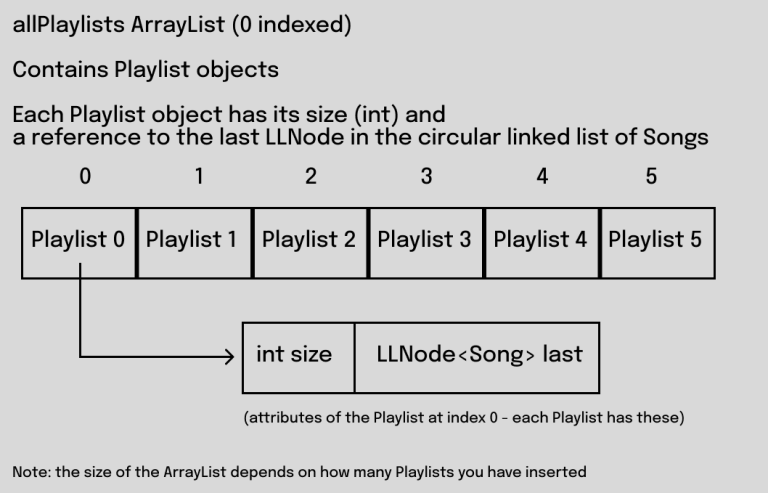
- an ArrayList to hold all the playlists in a library – the allPlaylists instance variable in MusicLibrary.java
- a Circular Linked List to hold all the songs in a playlist – the last node of the circular linked list is accessible by the “last” attribute of a Playlist object
Implementation
Overview of files provided
- MusicLibrary: holds all of the methods to be written and that will be tested when running the implementation of the music library. Edit the empty methods with your solution, but DO NOT edit the provided ones or the methods signatures of any method. This is the file you submit to Autolab.
- Song: holds the information for a song object (title, artist, year, popularity, and optionally a “link” for audio)
- Playlist: holds the information of a Playlist object (size, reference to the last node in the circular linked list of songs).
- Driver: A tool to test your implementation interactively. You are free to use this driver to test all of your methods.
- StdRandom: contains the StdRandom.uniformInt() method that you will use in the method that shuffles the playlist.
- StdIn and StdOut, which are used to read and write to input files. Also used by the driver. Do not edit these classes.
- Multiple CSV files to help test your code. Edge case files are already provided.
Note that: Song.java and Playlist.java all have the extends keyword in their class declarations.
- Song extends Comparable112<Song>
- Playlist extends Comparable112<Playlist>
This simply means that each of these classes must implement the equals(), toString(), and compareTo() methods. These are provided for you, but may be useful.
Working with LLNode<> objects
For assignments/labs in CS112, we will use a cs112.jar file containing useful classes. This includes the LLNode<> class, which implements a linked list node.
- The LLNode class takes in a generic type, which means it can store any type of data.
- Making a node: LLNode<T> newNode = new LLNode<T>(data) (replace T with a type)
- Note that the data must be passed in for the constructor, and the data of a node can not be changed later (aka it is immutable)
- Methods:
- getNext() – returns the next node in the linked list
- getData() – returns the data stored in the current node
- setNext(LLNode<T> nextNode) – sets the next node of the current node to nextNode
In this assignment, you will use LLNodes for Song objects being stored in a playlist.
Input Files
7 csv input files are included; they store information regarding Songs and the appropriate data needed to make Song objects. CSV input files which cover many edge cases are already provided to you. You are welcome to create your own input files, as they will not be submitted to Autolab.
For example, 2010.csv contains data for 8 songs (from 2010), this file has 8 lines.
Each input file is a CSV (Comma Separated Values) file, where each line corresponds to one song, and within each line the commas separate the different pieces of data needed to create a Song object for this song.
For each line, we have the song name, then the artist, then the year it was made, then the popularity score, and finally a link to play the song which is just the name of the file under songs/. Example of a single line from the csv:
Hey Soul Sister,Train,2010,83,HeySoulSister.wav
You will use this information to build the circular linked list within a Playlist object (explained in the first method you will implement).
Here are some visuals to help explain the structure of this assignment:

Task: update and submit MusicLibrary.java to Autolab
- DO NOT add new import statements.
- DO NOT change any of the method’s signatures.
- You are allowed to create helper methods if needed, but please ensure they are private (encapsulation!).
The class contains:
- allPlaylists is an ArrayList of Playlist objects
- provided methods that are used by the driver and empty methods you are expected to write your code in.
Note: the printLibrary() method is provided to you and could possibly help with debugging. This method goes through the allPlaylists ArrayList, and prints out the contents of all Playlists that have been added.
Methods to be implemented by you:
1. constructPlaylist(String filename)
This method takes the data from an input csv file, and creates a playlist object from it.
To complete this method:
- Create a new Playlist object
- Open the file using StdIn.setFile(filename)
- Declare a LLNode reference that will refer to the last song of the circular linked list
- Create a counter variable to keep track of the number of songs in the playlist
- While there are still lines in the input file (remember that StdIn.isEmpty() returns true if every line in the input file has been read):
- Read a single song from the file (see the information after these steps for the input file format)
- Create a Song object with the information read from the file
- Create an LLNode that holds the Song object from step 5.2
- Insert the LLNode from step 5.3 to the END of the circular linked list (use the reference from step 3). Remember to update which node is the last node, and also remember that the last node needs to point to the front
- Increase the count of the number of songs already in the circular linked list
- Return the Playlist object from step 1, that includes both the LLNode object from step 3 (reference to the last node) and the number of songs
If the playlist is empty, return a Playlist object with null in the last field, and 0 as its size.
For step 4.1: Use the StdIn library to read from a file, to read one song do:
String[] data = StdIn.readLine().split(“,”);
String name = data[0];
String artist = data[1];
int year = Integer.parseInt(data[2]);
int pop = Integer.parseInt(data[3]);
String link = data[4];
The input files have songs in decreasing popularity order; so the list should also be kept in this order. DO NOT implement a sorting algorithm, there is no need.
- Submit MusicLibrary.java with just this method completed (others can be blank) under Early Submission to receive 5 points of extra credit.
Use the pre-implemented addPlaylist() method to test this method. Add the playlist at index 0 (to represent this will be the playlist in the first position). This is the expected output for 2010.csv:

We provide many csv files for you to test with. For example, you can test edge cases with blank.csv (empty list), singleSong.csv (one node, which should point to itself), etc.
[PROVIDED] addPlaylist(String filename, int playlistIndex)
This method adds a playlist to the allPlaylists ArrayList.
- This method is implemented for you
- Write createPlaylist() to make this method work – this method calls createPlaylist() with the provided filename
If playlistIndex >= size of the ArrayList, then it will add to the end. If playlistIndex <= 0 then it will add to the front of the ArrayList. Otherwise, it will add to the specified index in the ArrayList. Remember, the ArrayList is 0 indexed, meaning the first Playlist is located at index 0 in the ArrayList.
[PROVIDED] removePlaylist
This method removes a playlist from the library. If the allPlaylist ArrayList is not null and the provided playlistIndex is in a valid range for all play lists we have now (remember its 0 indexed), then it will remove this Playlist from the ArrayList.
- This method is implemented for you
[PROVIDED] addAllPlaylists(String[] filenames)
This method takes an array of filenames, where each file contains information for one playlist, and adds each playlist to the library.
For every specified input file in filenames, this calls addPlaylist on that input file.
- This method is implemented for you
2. addSong(int playlistIndex, int position, Song newSong)
This method adds a song to a specified playlist at a given position.- The first node of the circular linked list is at position 1, the second node is at position 2 and so forth.
- Inserting at position 1 means the song will come first in the playlist, 2 means it will come second, etc.
- The playlist is specified by playlistIndex. The playlistIndex is the index of the playlist in the allPlaylists ArrayList. The first one is at index 0 (zero).
- A song can be inserted to a playlist of n Songs at position n+1, it will be inserted at the end of the playlist (adding to the end is an edge case that specifically needs to be handled!).
- A song cannot be inserted to the playlist if the position is either less than 1 or greater than n + 1, but any position in the range [1, n+1] is valid
- REMEMBER: a circular linked list has a reference to the LAST node in the list, and that node points to the front.

Once again, you can use the different csv files to test different edge cases. Try verifying the method works when inserting in numerous positions (front, end, in the middle).
3. findSong(int playlistIndex, String songName)
This method will attempt to find a song in the circular linked list at the specified playlistIndex. We are searching for the song based on its song name, if the name matches the songName String then we have successfully found the song. Remember to use .equals() to compare the content of Strings, rather than the memory locations of them.
Traverse through the circular linked list and compare the song names. Once we have successfully found the song, we return the entire Song object for this song. Remember the .getData() method for LLNodes, explained above.
If we have not found the song after going through the whole list, then we return null.
In this example, we first run addPlaylist with 2010.csv and insert the playlist into index 0 of the ArrayList. We choose the Test another method option. Then in the driver we choose option 5 to find a song by name. We will search for a song at index 0 of allPlaylists, and the song name will be “Secrets” (without parenthesis – and also case sensitive). Here is the output for this:
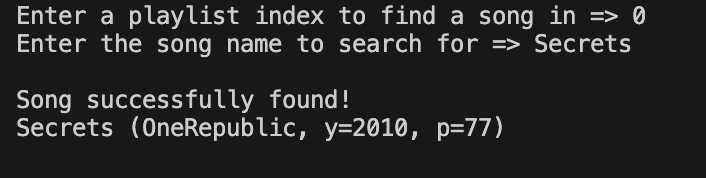
Remember to test other cases, such as the song not being present in the playlist, etc.
4. deleteSong(int playlistIndex, Song song)
This method removes a song at a specified playlist, if the song exists.
- The playlist is specified by playlistIndex. The playlistIndex is the index of the playlist in the allPlaylists ArrayList. The first one is at index 0 (zero).
Return true if the song was found and removed from the specified playlist, or false otherwise (leaving the playlist unmodified).
To find the song in the playlist, make sure to traverse the linked list and use .equals() on the Song objects.
Remember that Java automatically garbage collects objects that are no longer reachable. Think about what makes a node “reachable” in a linked list, if the node is no longer reachable then that means it has been removed from the playlist.
If the song has been removed from the playlist, decrease the size of the corresponding playlist by one.
- REMEMBER: the reference to a circular linked list refers to the LAST node in the list, and that node points to the front.
In this example, we first run addPlaylist with 2010.csv and insert the playlist into index 0 of the ArrayList. We choose the Test another method option. Then in the driver we choose option 6 to delete a song, and we want to delete from the playlist at index 0. We will delete the song “Dynamite”, with artist “Taio Cruz”, year 2010, and popularity 77. Here is the output after running this:

Remember to test other cases as well, such as the song to delete not being present in the circular linked list.
5. reversePlaylist(int playlistIndex)
This method reverses the specified playlist.
The “next” pointers of each node in the circular linked list are to be changed so that they point to the LLNode that came before it. Hint: you might find it helpful to temporarily store references to neighboring nodes as you update each link.
After the list is reversed:
- The playlist needs to still be a circular linked list, where the last node points to the front
- The playlist should continue storing a reference to the last node in the list
- The new last node will be the node that was originally the first node in the playlist
NOTES
- The playlistIndex is the index of the playlist in the songLibrary. The first one is at index 0 (zero).
- REMEMBER: the pointer to a circular linked list points to the LAST item in the list, and that item points to the front.
In this example, we first run addPlaylist with 2010.csv and insert the playlist into index 0 of the ArrayList. We choose the Test another method option. Then in the driver we choose option 7 to reverse a playlist, then we choose index 0. Here is the output after running this:

6. combinePlaylists(int playlistIndex1, int playlistIndex2)
This method combines two playlists. playlistIndex1 and playlistIndex2 will always be different numbers.
- Both playlists have songs in decreasing popularity order. The resulting playlist will also be in decreasing popularity order.
This is done with the following procedure:
- Determine which playlist has the lower playlistIndex. The combined playlist will ultimately replace this playlist in the library.
- Declare a LLNode reference that will point to the last node of the combined playlist.
- While both playlists are not empty, compare the front node of both playlists and select the song with the higher popularity score. If they have equal popularity, then choose the one from the lower playlistIndex.
- Place this song at the end of the combined playlist, and remove this song from its original playlist.
- When one playlist becomes empty, add the remaining songs from the other playlist to the end of the combined playlist.
- Assign the combined playlist to the index with the lower playlistIndex in the allPlaylists ArrayList, and delete the playlist at the higher playlistIndex from the ArrayList as well.
You may assume both playlists are already in decreasing popularity order. If two songs from different playlists have the same popularity, add the song from the playlist with the lower playlistIndex first.
Once the playlists have been combined, the combined playlist is expected to be stored in the playlist at the lower playlistIndex, and the playlist at the higher playlistIndex is expected to be removed using the removePlaylist() method.
NOTES
- Remember that the lower playlistIndex should hold the new combined playlist, and the higher playlistIndex should be removed. DO NOT assume that playlistIndex1 is necessarily less than playlistIndex2.
- DO NOT implement a sorting algorithm, as both playlists are already in decreasing popularity order.
- Keep in mind that the playlists may be empty.
- REMEMBER: the pointer to a circular linked list points to the LAST item in the list, and that item points to the front.
In this example, we first choose option 3 to create multiple playlists from multiple CSVs. We enter 2010.csv, then 2011.csv, then done. We choose the Test another method option. Then in the driver we choose option 8 to combine 2 playlists, with the first playlist index being 0 and the second being 1. Here is the output after running this:
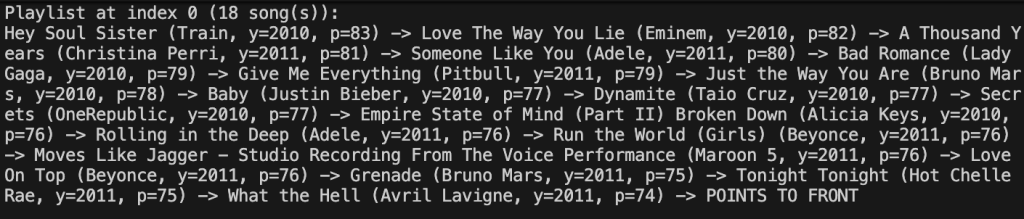
When testing combinePlaylists, Autolab will first add all 7 input files as their own Playlist in the allPlaylists array. The order will be 2010.csv at index 0, 2011.csv at index 1, 2012.csv at index 2, allSongs.csv at index 3, blank.csv at index 4, singleSong.csv at index 5, and singleSong2.csv at index 6. You can use this information to help interpret your hints if these tests do not pass.
7. shufflePlaylist(int playlistIndex)
This method shuffles a specified playlist. It does it using the following procedure:
- Create a new LLNode reference to store the shuffled playlist in.
- While the size of the playlist is not 0 (zero), randomly generate a number using StdRandom.uniformInt(1, size + 1). This is the position of the song we will use in the next step.
- Remove the corresponding node from the original playlist and insert it into the END of the new playlist (1 being the front of the list, 2 being the second node, etc).
- After all songs have been added, update the old playlist reference with the new shuffled playlist.
NOTES
- Notice that the driver is setting a seed for the random number generator. The seed value is 2026. Since we are using seeding, your answer must match the output below/the expected output from Autolab, as seeding allows us to get the same sequence of random numbers every time we restart.
In this example, we first run addPlaylist with 2010.csv and insert the playlist into index 0 of the ArrayList. We choose the Test another method option. Then in the driver we choose option 9 to shuffle a playlist, then we choose index 0. Here is the output after running this:

Implementation Notes
- YOU MAY ONLY update the methods with the “write code here” comment.
- COMMENT OUT all print statements you have written from MusicLibrary.java before submission
- DO NOT add any instance variables to the MusicLibrary class.
- DO NOT change any of the method signatures.
- DO NOT add any public methods to the MusicLibrary class.
- DO NOT add/rename the project or package statements.
- DO NOT change the class MusicLibrary name.
- YOU MAY add private methods to the MusicLibrary class.
- DO NOT use System.exit()
- DO NOT use System.exit()
VSCode Extensions
You can install VSCode extension packs for Java. Take a look at this tutorial. We suggest:
Importing VSCode Project
- Download MusicLibrary.zip from Autolab Attachments.
- Unzip the file by double clicking.
- Open VSCode
- Import the folder to a workspace through File > Open
Executing and Debugging
- You can run your program through VSCode. We suggest running through VSCode because it will give you the option to debug.
- Make sure you open the MusicLibrary folder directly, or else there may be issues with running the driver and/or reading the input files.
- You can refer to the lab 3 instructions for information on how to debug
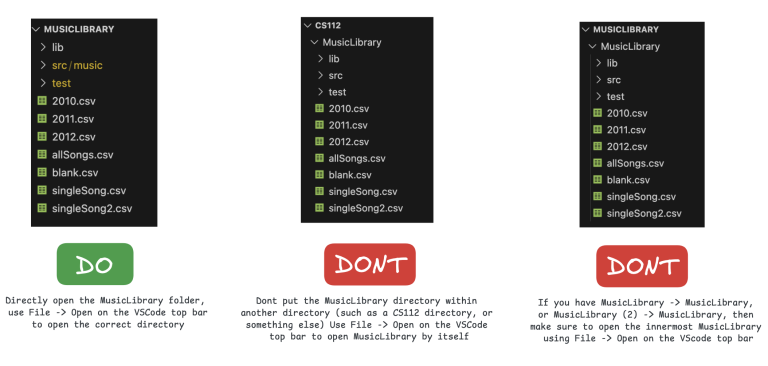
Before submission
Collaboration policy. Read our collaboration policy on the course syllabus.
Submitting the assignment. Submit MusicLibrary.java separately via the web submission system called Autolab. To do this, go to Autolab and find the correct assignment and submit your Java file.
Getting help
If anything is unclear, don’t hesitate to drop by office hours or post a question on Piazza.
- Find instructors and Lead TAs office hours here
- Find tutors office hours on Canvas -> Tutoring
- In addition there is the Coding and Social Lounge (CSL), a community space staffed with student community managers which are undergraduate students further along the CS major to answer questions.
Problem by Jeremy Hui and Vian Miranda.
