
Overview
In this assignment, you will implement a friends list of a social network using a resizing adjacency matrix, with features such as adding and removing friends, and searching for friends.
An adjacency matrix is a 2d array which is of size V by V, where V is the number of vertices in the graph. The entries in each space tell us if there is an edge between the 2 vertices. Here is an example:
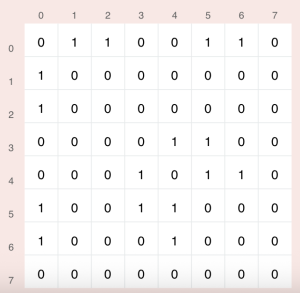
In this case V is 8, so our vertices range from indices 0 to 7 inclusive, and the adjacency matrix is an 8×8 2d array. matrix[0][1] having the value 1 means that there is a connection between vertex 0 and 1, while matrix[1][2] containing 0 means there is no edge between vertices 1 and 2.
This lab is on undirected graphs, meaning that an edge will go both ways every time (unlike a directed graph where edges can only go one way). In the above adjacency matrix, notice how matrix[0][1] == matrix[1][0], this is true for any 2 vertices since this is an undirected graph. When we add an edge between 0 and 1 we need to make sure it is set both ways to represent an undirected edge.
Note: in the lab you will code with an adjacency matrix that uses booleans instead of ints, where true represents that an edge is present and false represents that an edge is not present.
Implementation
Overview of files provided
SocialNetwork.java – This class contains the basic operations to be performed on the adjacency matrix. You will edit this class to implement the methods and submit to AutoLab.
Profile.java – This class file stores data about a user’s profile and contains the user’s username, name, and status.
Driver.java – The driver provides an interface for creating profiles, adding/removing friends, and viewing the graph structure. You can use this to test your solution and check if it behaves as expected.
Instance variables in SocialNetwork.java:
- profiles — an ArrayList of profile objects which contains the user profiles that are present in our graph — each profile is another vertex in our graph
- graph — a 2d boolean array which is our adjacency matrix, the entries in this 2d array tell us whether or not there is an edge between 2 vertices
Note that the above are parallel, meaning if something is at index “x” in the profiles arraylist, in the adjacency matrix it will correspond to index “x” as well (both row and column).
Some useful information about ArrayLists:
An ArrayList is an ordered array-like structure with no size limit, as it automatically resizes.
- You can initialize an empty ArrayList named “name” which holds objects of type “Type” with ArrayList name = new ArrayList<>();
- For example, an ArrayList of integers named “arrList” is initialized with ArrayList arrList = new ArrayList<>();
- You can add a new element of type “Type” to the end of your ArrayList in average case O(1) time with name.add(newElement);
- Do NOT use addLast(), Autolab uses Java 17 while this method is from Java 21 so your code will not compile in Autolab if you use this
- You can get the element at some index of your ArrayList in O(1) time with name.get(index);
- You can check if the ArrayList contains some element (returns a boolean) in O(n) time with name.contains(element)
- You can find the index of an item in the ArrayList using name.indexOf(item) — if the item is not present in the ArrayList this will return -1
- To get the number of elements in the ArrayList, use name.size()
Methods to be implemented by you
addProfile
This method adds a new Profile to the ArrayList of Profiles. If the profile is already present in the ArrayList then just do nothing (use the ArrayList contains() method).
Since adding a new Profile adds a corresponding vertex to our graph, we will then have to resize the adjacency matrix. Create a new 2d array with an extra row and column, copy over the values from the old adjacency matrix, then update the “graph” instance variable to the new updated adjacency matrix.
Remember, the Profiles ArrayList and the adjacency matrix are parallel, meaning that if something is at index “x” in the Profiles ArrayList, then it will also correspond to index “x” in the adjacency matrix (both row and column). When we resize our adjacency matrix from size n to n+1, the first n by n values will be exactly the same (and need to be copied over), and the extra row and column would be new, since this is a boolean matrix they will have default values of “false”.
Here is the Driver after adding the profiles (“username1”, “name1”, “status1”), (“username2”, “name2”, “status2”), (“username3”, “name3”, “status3”)
Note: The driver will display the most recently added profile (the third one shown above). You should use the Next Profile and Previous Profile buttons to cycle through the Profile list, to check that they all appear and are in the correct order.

setFriend
Create/remove a link between the two user profiles by retrieving the corresponding index and adding/removing edges to connect/disconnect both users.
Check if both profiles exist in the network, and find the index of both user profiles. If you have the profile object, you can use the indexOf method to find the correct index (this method, along with some other ArrayList methods are explained above). If one or both of the users do not exist, then simply do nothing. If the users do exist, then we will set the entries in the adjacency matrix at the corresponding indices to the “areFriends” boolean. This boolean could either be true or false, if it is true then we are adding a friendship, and if it is false that represents removing a friendship.
Since this is an adjacency matrix, if the value at graph[i][j] is true, then that corresponds to a single directed edge from vertex i to vertex j. Thus, to set an undirected edge between x and y, set the values at both graph[x][y] AND graph[y][x].
We add connections even if both profile parameter are the same.
Here is the Driver after adding the profiles (“username1”, “name1”, “status1”), (“username2”, “name2”, “status2”), (“username3”, “name3”, “status3”)
and then:
- with the “username1” profile selected, add the “username3” profile as a friend.
- with the “username2” profile selected, add the “username3” profile as a friend.
the Driver should display the following under the “Social Network Graph” tab:

Finally, test one more thing with the above scenario: add a new “username4” profile to the graph, and ensure that ALL edges are preserved in the new resized graph.
Note: the “friends” list will not show added friends until you implement allFriends(). Additionally, the button to test removing friends will not appear until you implement allFriends().
searchFriend
This method searches for an edge between two Profiles, to determine if they are friends.
Return false if either user does not exist in the graph. Then, return true if there is an undirected edge between those two profiles in the adjacency matrix, otherwise return false.
To test this method, simply verify that the functionality of the “Add Friends” column properly works. It should ONLY show the users which the currently selected profile is NOT yet friends with, and it should exclude all of users current friends.
allFriends
Populate an arraylist of all the friends a user has in an arraylist of profiles.
Check if the user we are searching for exists, otherwise return an empty arraylist. If the profile exists, search through the corresponding row/column of the user’s index and populate an arraylist by iterating through this row/column and adding every Profile which is a friend of this user.
To test this method, simply verify that the functionality of the “All Friends” column properly works. It should ONLY show the users which the currently selected profile is already friends with, and it should exclude all other non-friends.
