Overview
Welcome to the mushroom kingdom! Here, Racers and Players test their driving and board game skills in races and minigames against the Mushroom Kingdom’s best! After these events take place, we need to manually sort the contestants which takes us days. Now we need you to come up with a way to find a winner more efficiently!
Provided Classes
Mario Sort uses a few supporting classes for input/out as well as storing data about contestants. In the project folder, you are provided the java files for these classes, MarioSort.java, Player.java, Racer.java, StdIn.java, StdOut.java, Driver.java.
StdIn.java: This class includes methods for reading from the terminal/a file
StdOut.java: This class includes methods for printing to the terminal/a file
Player.java: This class stores data about a single Mario Party player, including their name, num stars, and num coins. Winners are determined by who has the most stars. If a tie exists, then coins are used to break it.
Racer.java: This class stores data about a single Mario Kart racer, including their name, and an int[] array of lap times. A getAverage() method exists to get the average lap time, which is used to determine a winner.
Driver.java: This is a simple visualization class which can load any of the input files, and then sort them. You can use this to test your code, and determine if you are sorting properly.
MarioSort.java: This is the only file you will code in, and is the file you will submit to Autolab. Fill in the sortMarioKart() method, and mergeHelper() method according to the descriptions below.
Directions
- DO NOT add new import statements.
- DO NOT add any new class attributes
- DO NOT change any of the method’s signatures.
- DO NOT modify the given constructor.
To complete this Lab, you will fill in MarioSort.java with the solutions for sortMarioKart(), and mergeHelper(). The merge() method for merge sort is given to you. The readData() method to read input files is also provided (along with getter methods).
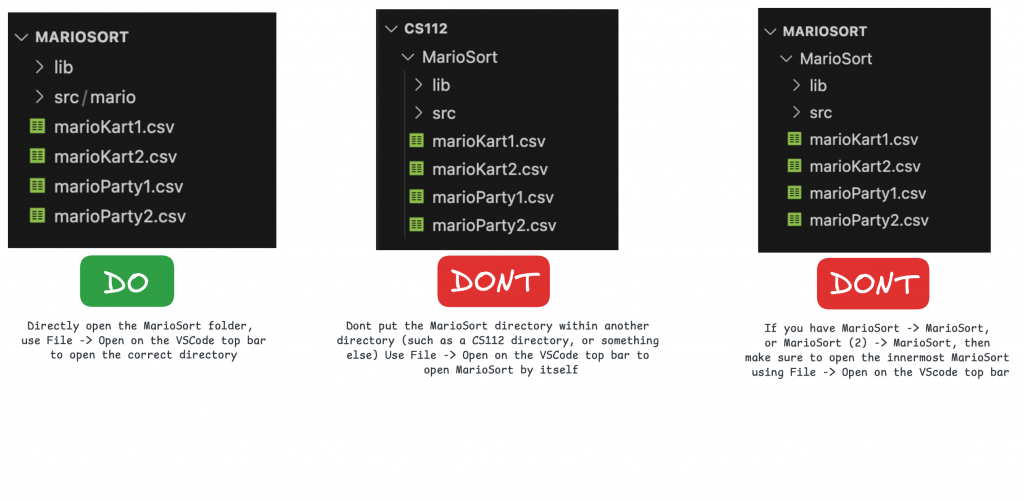
To Run: run the following commands from the innermost MarioSort directory, containing the src and bin folders.
- Compile:
- javac -d bin -cp lib/cs112.jar src/mario/*.java
- Run:
- Windows: java -cp “lib/cs112.jar;bin” mario.Driver
- Mac/Linux: java -cp bin:lib/cs112.jar mario.Driver
OR: Run through VSCode, ensuring you open the correct innermost MarioSort directory
readData() [PROVIDED]
THIS METHOD IS PROVIDED TO YOU.
This reads in racer/player data from a CSV, and populates the corresponding array.
- Filenames containing “kart” (for Mario Kart) will be expected to contain Racer object info, and will populate the marioKart array.
- Filenames containing “party” (for Mario Party) will be expected to contain Player object info, and will populate the marioParty array.
Do NOT change the input file names. If you create custom input files, make sure they follow the above naming scheme.
sortMarioKart()
This method needs to implement selection sort in order to sort winners of a Mario Kart race. Winners are determined by their average lap time (using the Racer getAverage() method).
The marioKart array already contains the Racer objects which you should sort. After this method is called, the marioKart array should be sorted in ascending order by average lap time.
If the marioKart array is null or length is 0, then simply return.
View the lecture slides for Selection Sort implementation details for Java. Note that the format of this lab may be slightly different, but the algorithm is identical.
You are allowed to create any helper methods if needed, but they are not required.
How to test: run the driver (see the How to open + run section below), then select “marioKart1.csv” or “marioKart2.csv” under the dropdown menu. Then click the load button to see the unsorted data and click the Sort button to see it sorted. The racers will be sorted by their average lap time, with the fastest racers at the top.
sortMarioParty() [PROVIDED]
THIS METHOD IS PROVIDED TO YOU. This simply calls the mergeHelper() method (next task), to start your recursive merge sort algorithm.
mergeHelper()
This method is what drives merge sort, and recursively breaks down the array by half.
ONLY IF the left param is < the right param:
- calculate the middle index as left + (right-left)/2
- call mergeHelper() with the params arr, left, middle
- call mergeHelper() with the params arr, middle+1, right
- call merge() with the params arr, left, middle, right
How to test: run the driver (see the How to open + run section below), then select “marioParty1.csv” or “marioParty2.csv” under the dropdown menu. Then click the load button to see the unsorted data and click the Sort button to see it sorted. This tests merge sort as a whole. Players will be sorted first by the number of stars they have, and any tiebreakers are settled by the number of coins. The player with the most stars will be at the top once the array is sorted, and so on.
merge() [PROVIDED]
THIS METHOD IS PROVIDED TO YOU.
This method handles merging two subarrays of a larger array, such that both subarrays end up merged and sorted together.
This is what actually “sorts” the elements for merge sort. You will call this method in mergeHelper().